
As widely known, Google, like most tech giants, collects a substantial amount of information about you. This data is valuable to the California‑based company because it allows it to improve its products, such as data gathered via Google Bard, and personalize ad delivery based on users’ profiles and interests.
If you wish to consult the information Google holds about you and configure its use for ad targeting, you can visit the page "myadcenter· (My Advertising Preferences).
Google Data Collection for Advertising Targeting
Google Analyzes Your Online Activities
In the "myadcenter" interface, you can see the information Google uses to target the ads shown to you. The company examines your online activity, as well as your YouTube history (videos watched and searches), and takes your geolocation into account. Google states that "general areas where you have used Google sites and apps in the past may influence the ads you see."
Google Tries to Build Your Profile
More surprisingly, the page reveals certain general information that Google knows or assumes about you. The company attempts to define your general profile, particularly regarding the following characteristics:
- Gender and age category, based on your Google account information.
- Number of languages spoken, including the language indicated on your account and Google assumptions based on those you frequently use on its services.
- Relationships (single, in a relationship or married).
- Education level, with the indication that "relevant ads evolve when your education level changes. For example, if you have completed secondary school, ads for training programs may interest you."
- industry sector, with the precision that 'ads are more effective when broadcast to people who will find them useful.'
- Size of the company you work for (small, large, or very large enterprise).
- Occupancy status (owner or tenant).
- Family situation (with or without children) and children’s age category.
Manage Your Privacy
The “myadcenter” section is not limited to consulting your data; it also offers the possibility to configure your preferences regarding the use of your information for advertising targeting.
Customize Your Advertising Preferences
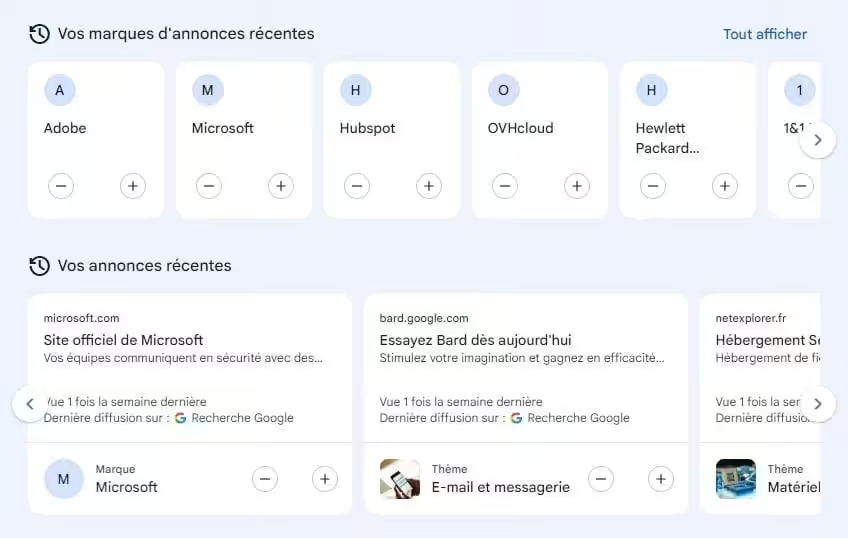
If you want to change the types of ads you see, go to the “Customize Ads” section. You’ll find three categories: topics, brands, and sensitive. Each includes various sections you can enable (by clicking “+”) or disable (by clicking “‑”) in your ads.
In addition, in the "My Ads" section, you can view the latest brands and themes presented to you. You also have the ability to influence the content offered to you.
Manage Your Personal Information On your dedicated page, you can also make changes. You can modify the information indicated on your account. Additionally, by clicking on the additional characteristics estimated by Google (relationships, education, industry, etc.), you have the option to refuse their use for personalizing ads.
Finally, Google provides various tools for you to delete your personal data (using the dedicated form) or to remove your name from search results.