
As is widely known, Google, like most tech giants, collects a considerable amount of information about you. This data is valuable to the California-based company because it allows them to improve their products, such as data gathered through Google Bard, and to personalize ad delivery based on user profiles and interests.
If you want to see what information Google has on you and control how it's used for ad targeting, you can visit the "{{NOTRANSLATE_1}}" page (My Ad Preferences).{{NOTRANSLATE_1}} (My Ad Preferences).
Google Collects Data for Ad Targeting
Google Analyzes Your Online Activity
In the "{{NOTRANSLATE_1}}" interface, you can see what information Google uses to target the ads shown to you. The company examines your online activity, as well as your YouTube history (videos watched and searches), and takes your location into account. Google notes that "general areas where you've used Google sites and apps in the past can influence the ads you see."
Google Attempts to Build Your Profile
More surprisingly, the page reveals certain general information that Google knows or assumes about you. The company tries to define your overall profile, particularly regarding the following characteristics:
- Gender and age group, based on information from your Google account.
- Number of languages spoken, including the language listed on your account and Google's assumptions based on languages you frequently use on its services.
- Relationship status (single, in a relationship, or married).
- Education level, with the note that "relevant ads change as your education level changes. For example, if you've completed secondary school, ads for training programs might interest you."
- Industry, with the clarification that "ads are more effective when shown to people who will find them useful."
- Size of the company where you work (small, large, or very large enterprise).
- Occupancy status (owner or renter).
- Family situation (with or without children) and the age category of children.
Manage Your Privacy
The "myadcenter" section goes beyond just viewing your data—it also lets you configure your preferences for how your information is used for ad targeting.
Customize Your Ad Preferences
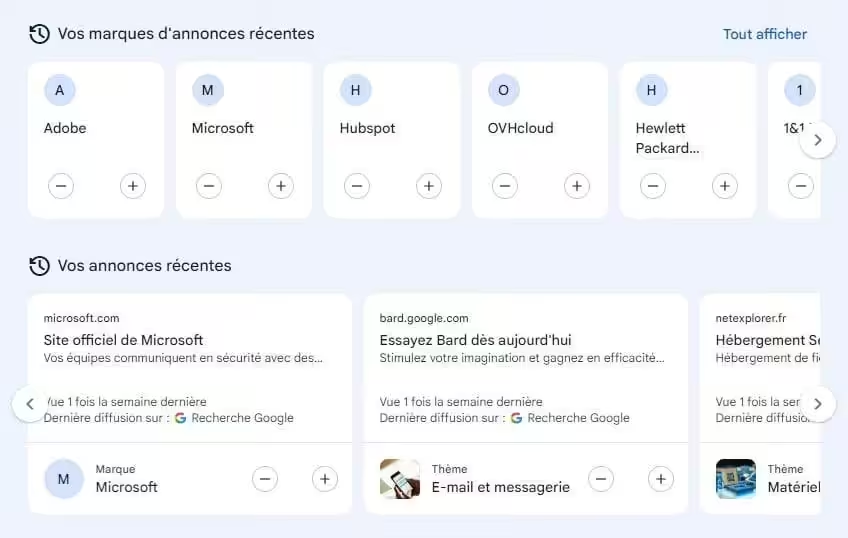
If you want to change the types of ads you see, head to the "Customize Ads" section. You'll find three categories there: topics, brands, and sensitive content. Each one has various subsections you can enable (by clicking "+") or disable (by clicking "-") for your ads.
Additionally, in the "My Ads" section, you can review the latest brands and topics you've been shown. You also have the ability to influence the content that's recommended to you.
Manage Your Personal Information On your dedicated page, you can also make changes. You can update the information on your account. Plus, by clicking on the additional characteristics estimated by Google (relationships, education, industry, etc.), you can opt out of having them used to personalize your ads.
Finally, Google provides you with various tools to delete your personal data (by using the dedicated form) or to remove your name from search results.